
Window cleaning, inside and out
$288.00
Interior and exterior glass, a wipe-down of every frame and sill, and careful attention to the windows facing your garden.
24 pane · $12.00 / pane
How often
Built for exterior cleaning
Bring your CRM, quoting, crew schedules, payments and customer conversations into one complete system. Built around exterior cleaning, with recurring work and AI properly connected.
Start 14-day free trialGlass, frames and sills on all 24 panes. Choose your visits and add the extras you need.
Workflow illustration
Your business, connected
Win the work, deliver it, get paid and give customers a reason to return.
Give customers a polished quote they can tailor to their home. Let them choose extras and repeat visits, with the savings visible as they choose.
Thanks for showing us around your home. Here is your window-cleaning quote, including the glass, frames and sills. Choose twice-yearly or quarterly visits to see your repeat-service savings right away.
Add or remove the optional services below, and pick how often each one repeats. Your total updates as you go.
Interior and exterior glass, a wipe-down of every frame and sill, and careful attention to the windows facing your garden.
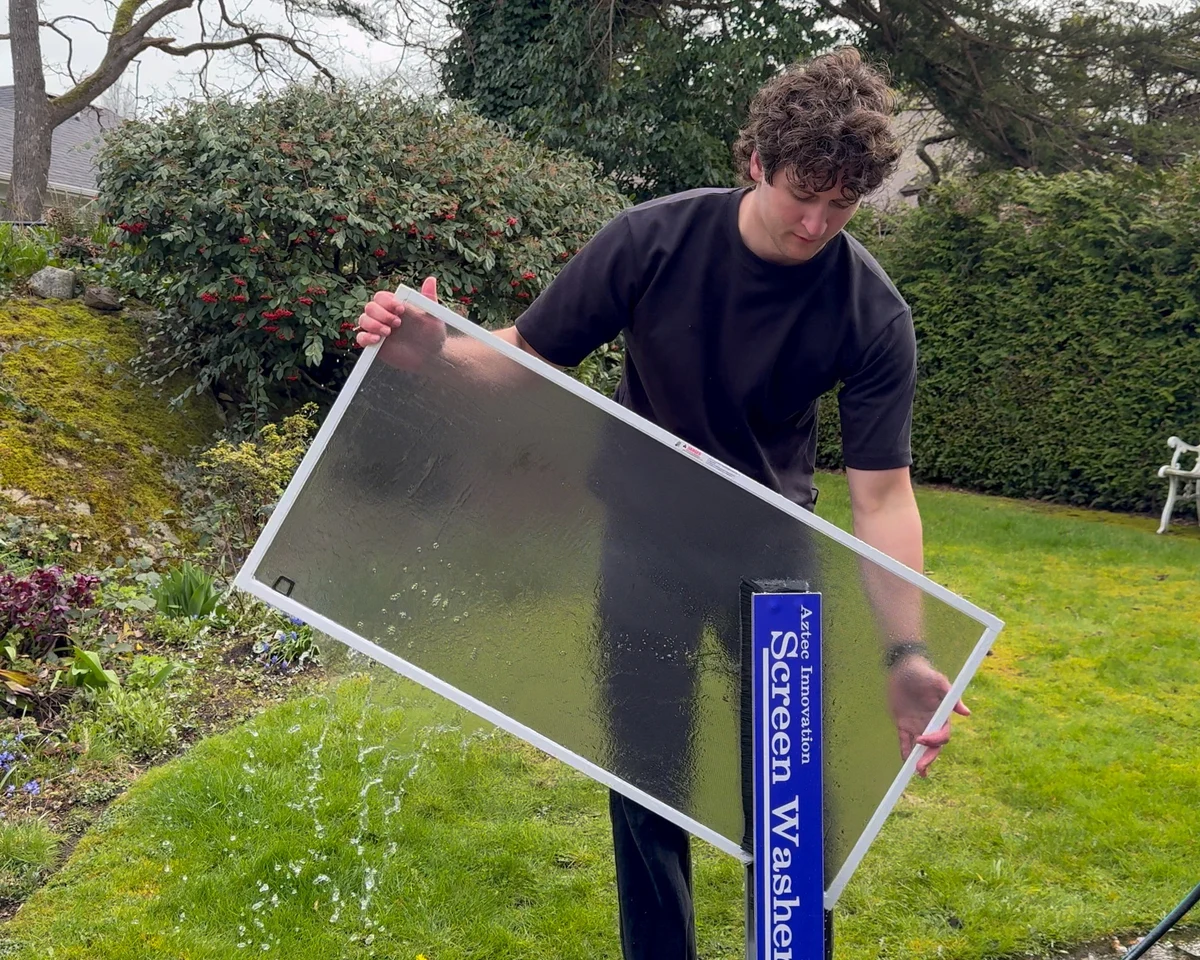
Remove, wash and reinstall each screen to clear away trapped dust and pollen.
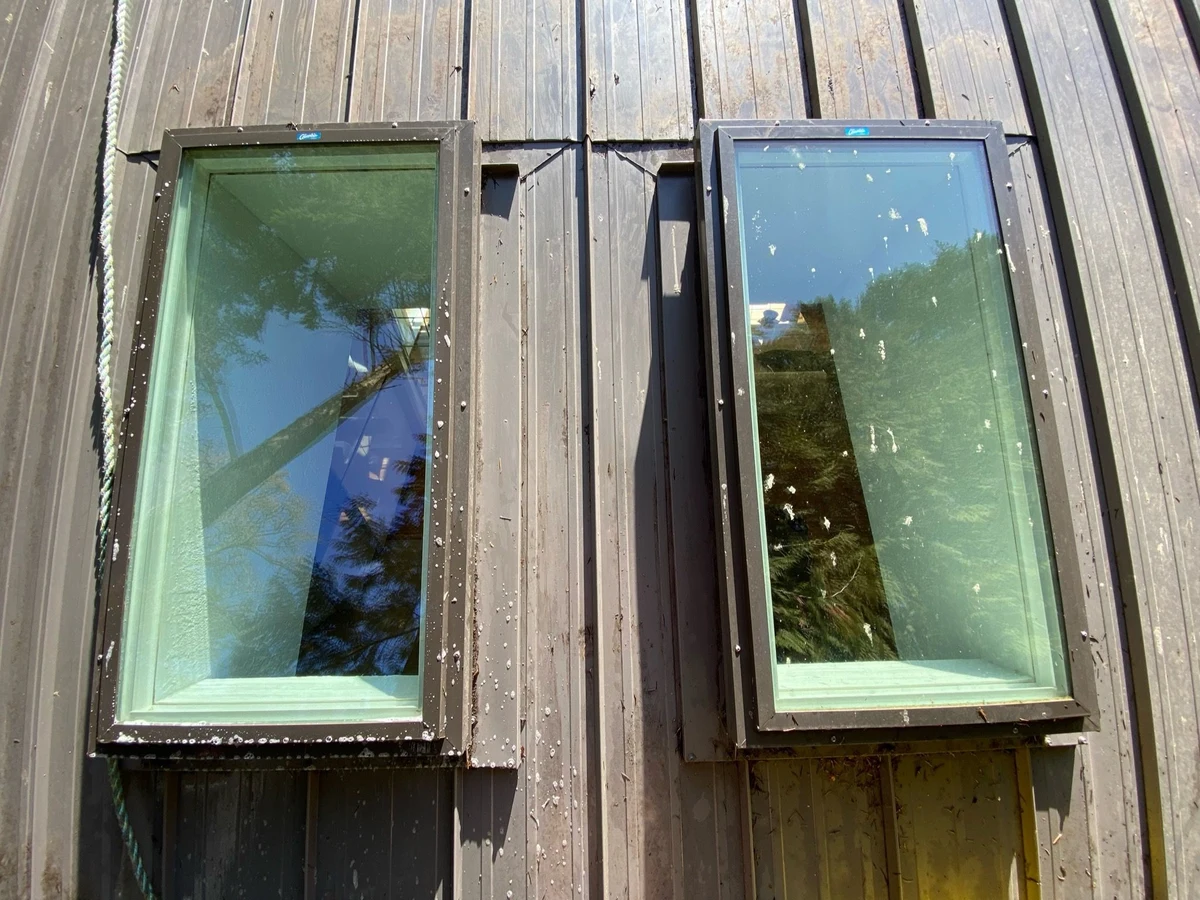
Exterior glass cleaning for both skylights, with frames wiped down and debris cleared away.

Remove leaves and debris, clear the downspouts and check that water flows freely.
Book your windows every three months and save 25% on each visit.
Book your windows twice a year and save 15% on each visit.
Add gutter cleaning to this visit and take $20 off the whole job.
Plan jobs, assign your crew and schedule employee shifts. Reuse weekly shift templates and organize the visits that come with recurring work.
Take an in-person payment, send an invoice customers can pay online, or charge an authorized card on file. Keep receipts and balances together.
An email about the quote. A text about the gate. A call before the crew arrives. Pick up the conversation in one customer thread, on web or mobile.
Turn an accepted recurring quote into a service plan. Keep its visits in your regular job workflow, with customer details, invoices and rebooking follow-ups close at hand.
Quarterly · Windows & screens
Set review rules around completed jobs or paid invoices. Send requests by email or text, manage reminders and see where each customer is in the process.
Made for the business behind the clean
Let customers see what they save when they choose repeat cleaning. Conditional discounts and optional services make the choices clear in the quote.
The recurring service becomes part of your normal work: customer records, future visits, crew schedules, invoices and saved cards.
Help keep customers from slipping through the cracks. Suds AI surfaces unanswered quotes and helps draft the next message. Use it alongside your own AI through MCP or the API.
Built around exterior cleaning.
What’s included
Quotes, field operations and review requests belong with the rest of your business. Here is what separate tools can cost.
| Your business needs | In ShineCRM | Separate software examples |
|---|---|---|
| CRM & field operations | Pipelines, follow-up automations, recurring services and crew scheduling |   |
| Customer management & repeat work | Customer records, recurring services and follow-ups |  |
| Quoting & sales follow-up | Quote choices, conditional discounts and Suds AI follow-ups |  |
| Proposals & signatures | Interactive quotes, optional services and online acceptance |  |
| Business calling | Business number, calls, texts and customer conversations |  |
| Customer texting | Text customers from their conversation in ShineCRM |  |
| Review requests | Review rules, requests, reminders and status tracking |  |
| API & developer access | Scoped API and MCP access, alongside Suds AI |  |
Housecall Pro Max + ResponsiBid Pro + NiceJob Starter
ShineCRM Starter · billed monthly
Public prices before tax, checked October 14, 2026. The example budget adds Housecall Pro Max, ResponsiBid Pro and NiceJob Starter at their regular monthly rates in USD. ResponsiBid’s billing currency was confirmed by Sean. Competitor dollar amounts are shown in USD where verified; rows with a currency not identified by their provider retain its published dollar notation. ShineCRM’s comparison price is its US Starter subscription; Canadian pricing is shown in the plan section. It is one possible set of subscriptions, not a minimum required stack or a claim of identical features. Some capabilities overlap. Quoted add-ons, usage and processing fees are excluded. ShineCRM allowances apply.
In the office. In the field.
Run the business from your desk or your phone. Your iOS and Android apps cover quotes, jobs, invoices, conversations and reviews. Technicians can see their schedules and track their time, with access suited to their role.
24 panes · Windows & screens
Simple monthly pricing
Starter
Before applicable taxes.
Explore it free for 14 days.
Enterprise
Need more?
More room for your operation.
500 outgoing SMS segments†
50 picture messages
100 call minutes
3,000 AI credits
100 transcription minutes
10 GB storage
1,000 outgoing emails
Shared by your team. Resets on your billing date. No automatic overage charges.
AI credits power transcription, summaries, writing and Suds AI.
During your 14-day trial: 500 AI credits, 1 GB of storage, 100 outgoing emails.
*Your business number, calling, texting and transcription activate after your first successful subscription payment and required verification.
Monthly billing begins after the trial unless canceled in Billing. Available in the US and supported Canadian regions, excluding Quebec.
†SMS segments hold up to 160 standard characters. Longer texts, emoji and some special characters can use more segments.
Keep your tools connected
Connect your calendar and payments. Bring a compatible AI client into your workspace through MCP.
Google Calendar 
 Square

 Gemini Spark
 See the difference for yourself
A polished quote. Clear repeat-service savings. The extras they want. Watch the customer journey from choosing their next visit to accepting with a card on file.
Start 14-day free trialThanks for showing us around your home. Here is your window-cleaning quote, including the glass, frames and sills. Choose twice-yearly or quarterly visits to see your repeat-service savings right away.
Add or remove the optional services below, and pick how often each one repeats. Your total updates as you go.
Interior and exterior glass, a wipe-down of every frame and sill, and careful attention to the windows facing your garden.
Remove, wash and reinstall each screen to clear away trapped dust and pollen.
Exterior glass cleaning for both skylights, with frames wiped down and debris cleared away.
Remove leaves and debris, clear the downspouts and check that water flows freely.
Book your windows every three months and save 25% on each visit.
Book your windows twice a year and save 15% on each visit.
Add gutter cleaning to this visit and take $20 off the whole job.
A few useful details
ShineCRM is built for exterior cleaning businesses: window cleaning, pressure washing, soft washing, gutter cleaning, roof cleaning, house washing, solar panel cleaning and holiday lighting. Its service pricing supports units such as panes and square feet.
Yes. Starter includes every standard feature. Enterprise adds custom limits, integrations, onboarding and features for your business.
Try ShineCRM for 14 days. Monthly billing begins after the trial unless canceled in Billing. Your price and first charge date are shown at checkout.
Live calling, texting and call transcription become available after the first successful subscription payment and required provider verification. During the trial, you can work with contacts, quotes, jobs, invoices, email and the trial AI allowance.
Suds AI requires your consent. Drafts wait for review. Supported automatic estimate, review and recurring follow-ups require the corresponding automation to be enabled, and a separate AI supervisor reviews messages before they send. AI activity uses your plan allowance.
Yes. Import a CSV file and map its columns to your contact fields. You can also add contacts individually in ShineCRM.
If your trial or paid service ends without payment, your saved business data stays in place. Manage billing to resume your subscription. Canceling a subscription does not automatically delete your data. A business number becomes available after the first successful subscription payment and required verification.
Actions with hard allowances pause when the allowance is exhausted, with no automatic overage charge. ShineCRM adds no payment processing surcharge for new accounts. Your connected payment processor still charges its own fees.
Put the business in order
Quotes, jobs, invoices and follow-ups. Give the work behind the work a home in ShineCRM.