ShineCRM

Jobs & Scheduling

Scheduling that actually understands your day.

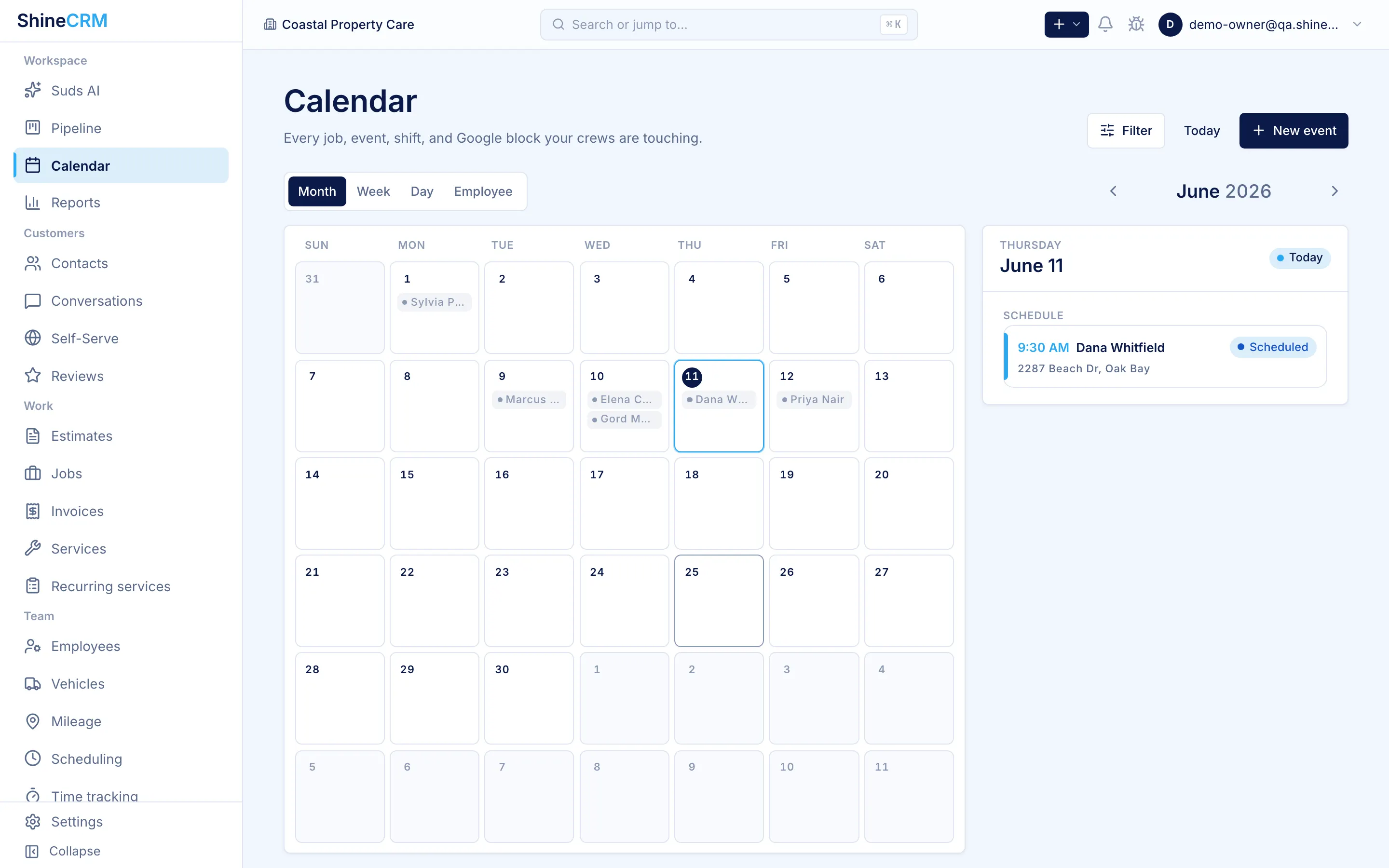
ShineCRM helps field service businesses schedule jobs, manage employee shifts, sync with Google Calendar, track job time, and record mileage. All from one connected workflow.

Google Calendar sync

Sync that goes both ways, where it actually matters.

Each user connects their own Google Calendar. From there, ShineCRM keeps your work calendar accurate without you ever editing a Google event by hand, and pulls in real conflicts so scheduling stops being a guessing game.

Job calendar sync

Jobs push to Google Calendar.

Create a job in ShineCRM, see it on your work calendar. Change the time later, the event updates. No double-entry, no stale calendars.

Shift calendar sync

Shifts push too.

Employees see their week in the calendar app they already use. No new login, no app to check, no excuse for missing a shift.

Busy-block import

Conflicts come into ShineCRM.

External calendar events sync in roughly every five minutes, or force a refresh on demand. Schedule around real life, not around a calendar that's always a step behind.

ShineCRM can show busy blocks from a connected Google Calendar so scheduling decisions are easier, without needing to expose unnecessary personal event details.

Real availability

Stop guessing who's actually free.

In many field service CRMs, the schedule only shows booked jobs. That's not enough. If a crew member has school, an appointment, a second job, or a vacation day, you may not see that when a customer calls asking for a time. ShineCRM brings the rest of the picture in.

Jobs and shifts on one schedule

See booked work and planned hours in the same view, instead of stitching two systems together in your head.

Availability before you commit

Before you say yes on the phone, check who's working, who's free, and who's already blocked off.

Multi-user assignment

Assign one crew member or the whole team to a job. The schedule reflects every assignment, not just the lead tech.

Fewer back-and-forth messages

Skip the "are you free Thursday?" group chat. The information is already in the scheduler.

Employee shifts

Plan the week. Publish the schedule. Book around it.

Unlike many field service CRMs, ShineCRM treats employee scheduling as a first-class part of the product, not something you manage in a separate spreadsheet, calendar app, or group chat. Plan who's working, publish shifts, and book jobs with a clearer view of real capacity.

Draft before you publish

Build out next week without notifying anyone. Adjust freely. Push it live when it's ready.

Synced to employee calendars

Once published, shifts land on each connected employee's Google Calendar.

Multi-user organizations

Multiple operators, dispatchers, and crew members work inside one ShineCRM org with scoped permissions.

Job time tracking

Every job teaches you something for the next one.

Jobs aren't just complete or not complete. ShineCRM records actual duration, attributes it to the assigned employees, and saves it to both the job profile and the customer profile. Over time you'll see which jobs are profitable, which take longer than quoted, and how much labor each customer actually requires.

Mileage tracking

The real cost of getting to the job.

Track mileage against each job and each vehicle, right inside the job workflow. Stop keeping mileage in a notebook, a spreadsheet, or a separate app that nobody updates after week two. The numbers stay tied to job history where they actually mean something.

Job history

Every customer has a complete record.

Each completed job stays connected to the customer profile: scheduled time, actual time, mileage, assigned employees, calendar sync status, notes, and service details. The next time they book, you already know what their property looks like, how long it took last time, and who did the work. Better quotes, faster scheduling, smarter planning.

Everything in one place

Eight capabilities. One connected scheduler.

Google Calendar sync

Push jobs and shifts to Google Calendar and keep changes updated automatically.

Busy-block awareness

See external calendar conflicts before booking work.

Employee shift scheduling

Draft, publish, and sync employee shifts from inside ShineCRM.

Multi-user job assignment

Assign one or multiple team members to each job.

Job time tracking

Track how long jobs actually take and save the history.

Mileage tracking

Record vehicle mileage for specific jobs and vehicles.

Customer job history

Keep performance and scheduling history connected to each customer.

Manual force sync

Refresh calendar data when you need the latest schedule information immediately.

How it compares

Built for the way small service businesses actually schedule.

Basic job calendars are useful, but they often miss the messy parts of real scheduling. Employees have personal calendars. Shifts change. Job times move. Every job has real labor and travel costs. ShineCRM brings these details into one workflow so owners can schedule with more confidence.

Capability Basic job calendar ShineCRM Jobs & Scheduling
Book jobs Yes Yes
Sync jobs to Google Calendar Limited or manual Yes
Update calendar when job time changes Often limited Yes
Pull personal busy blocks into the scheduler Often missing Yes
Manage employee shifts Often separate Built in
Push shifts to employee calendars Often separate Yes
Track actual job time Often limited Built in
Track mileage by job and vehicle Often separate Built in
Use job history for better planning Limited Yes

Frequently asked

Questions, answered.

Does ShineCRM sync with Google Calendar?

Yes. ShineCRM syncs both directions with Google Calendar per user. Jobs and shifts created in ShineCRM push to each assigned user's chosen Google Calendar, and external Google Calendar busy blocks pull back into ShineCRM's scheduler so you can see real conflicts before booking a job.

Can I schedule employee shifts in ShineCRM?

Yes. ShineCRM treats employee shifts as a first-class part of scheduling. Build draft schedules without notifying anyone, publish when ready, and synced shifts land on each employee's Google Calendar automatically.

Can I assign multiple crew members to one job?

Yes. ShineCRM supports multi-user job assignment. Each assignment shows up on the schedule and on the assigned user's calendar, with time tracking attributable per employee for accurate labor costing.

Does ShineCRM track actual job time?

Yes. ShineCRM records both scheduled time (what you booked) and actual time (how long the job really took). Job profiles and customer profiles both show this history so future quotes are based on real numbers, not guesses.

Can I track mileage by job and vehicle?

Yes. Mileage tracking lives inside each job and ties to a specific vehicle. Open a job to see its mileage, open a vehicle to see rolled-up history across all jobs.

How often does ShineCRM refresh external calendar events?

Background sync runs roughly every five minutes. You can also force a manual sync from the Google Calendar settings screen when you've just made a change in Google Calendar and want it reflected immediately.

Start scheduling smarter

Schedule jobs around real availability, not guesswork.

ShineCRM ties jobs, shifts, calendars, time, and mileage into one workflow so owners can run the schedule with more confidence and less back-and-forth.