ShineCRM

Services library

Service templates priced the way exterior cleaning actually works.

Generic field service platforms try to be every trade at once, so they end up shaped like nothing in particular. ShineCRM's service library is built for window cleaning, pressure washing, gutter cleaning, and soft wash crews. Real tier tables, per-pane pricing, default photos, per-service tax rates, and an archive that doesn't break last year's books.

Templates that fit the trade

Service templates, not generic line items.

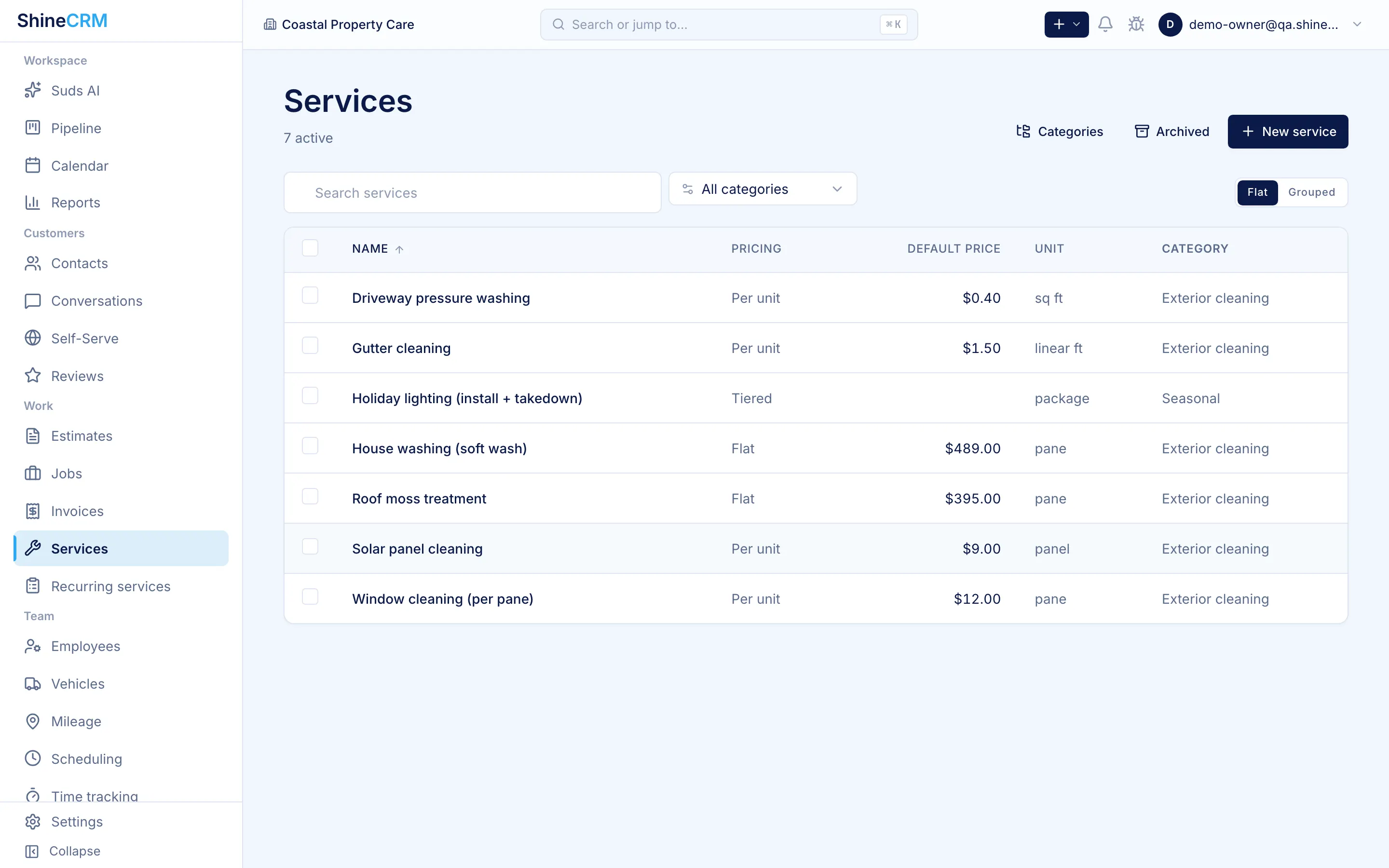
Save the services you actually offer as reusable templates. Each template carries a name, description, pricing model, default price, unit label, default photo with alt text, default tax rates, and a category. Pull one onto an estimate and it's ready to send.

Name and description

Line breaks preserved across the editor, estimate, and customer portal. What you wrote is what the customer reads, not a flattened single-line summary.

Pricing model

Per unit, tiered, flat, or custom. Pick the model that matches the job and the unit label that matches your trade.

Photo with alt text

Default photo pulls onto every estimate built from the template. Alt text supported for screen readers and accessibility.

Tax + category

One or more default tax rates per service, plus a category for fast picking when building an estimate.

Four ways to price

Per unit, tiered, flat, or custom. Pick the model that fits the job.

Every service uses one of four pricing models. The unit label flexes inside per unit, so you can charge per pane, per square foot, per item, or per hour with the same primitive. Honest and clear, not six fake categories that all do the same thing under the hood.

Per unit

Count it, price it, ship the quote.

Per pane, per square foot, per item, or per hour. One pricing model, four unit labels, no math gymnastics.

The pricing model the rest of the industry refuses to support natively for window cleaners.

Tiered

Named packages, flat prices.

Define a set of named packages on one service. Small home, mid home, large home, estate, or any structure that fits your trade. The operator picks the package that matches the property and the line uses that fixed total.

One service, four packages, no duplicate templates to keep in sync.

Flat

One number, no breakdown.

For services where you've already done the math and the customer just wants a price. Set it once, reuse it forever.

Custom

Operator-defined at quote time.

For one-offs, complex scopes, or jobs that don't fit a template. The line item is still attached to a service, so reporting stays clean.

Per unit, four unit labels

The per-unit model is a single primitive with a label that fits your trade. Same math, different vocabulary.

Per pane

Window cleaning

Per sq ft

House wash, roof, decks

Per item

Screens, skylights, chandeliers

Per hour

Custom, one-off, hard-to-scope

Tiered pricing

Named packages on a single service, not duplicate templates.

The 20-pane condo and the 90-pane estate aren't the same job, so they shouldn't share a single flat price or live as three near-identical service templates. ShineCRM lets one service carry a set of named packages, each with its own flat total. Build the estimate, pick the package that fits the property, done.

A worked example, in product.

One service called "Exterior window cleaning," with four named packages by property size. When the operator adds the service to an estimate, ShineCRM shows the package list. They pick "Mid home," the line is created at that flat total, and the quote reads cleanly to the customer.

  • Each package carries its own label, so the customer sees "Mid home" on the quote, not "Tier 2."
  • Quantity bands describe the package, so operators (and customers) understand which package fits.
  • Adding, renaming, or repricing packages doesn't break historical estimates or invoices.

Service

Exterior window cleaning

Tiered
Package Fits Price
  • Small home Up to 25 panes $200
  • Mid home 26 to 50 panes $375
  • Large home 51 to 90 panes $580
  • Estate 91+ panes $750

Each row is a named package on one service. Operator picks one, the line uses that flat total.

Photos that sell

Default photos that pull onto every estimate.

Attach a photo to a service template once. Every estimate, invoice, and portal page built from that service pulls it in, sized and laid out properly. No thumbnail strips, no broken aspect ratios, no chasing down a stock image at 9pm.

Photos uploaded from the truck via the mobile app are resized client-side before upload to keep things fast on weak signal. Alt text is supported for screen-reader friendliness.

Descriptions that read like writing

Scope notes that don't collapse to one line.

Service descriptions preserve line breaks across the editor, the estimate, and the customer portal. Bullet a scope, separate inclusions from exclusions, write a paragraph if the job needs one. What you wrote is what the customer reads.

Categories

Group your library the way your team picks it.

Build categories for the way you actually estimate. Windows, pressure washing, gutters, roof, add-ons, whatever fits. Set the sort order so the picker matches your mental model. Delete a category and ShineCRM reassigns its services for you instead of leaving the library broken.

Services library

30 active
  • Windows 6
  • Pressure washing 8
  • Gutters 4
  • Roof + soft wash 5
  • Add-ons 7

Why categories matter when you're quoting fast.

Building a quote from a flat list of 40 services is a friction tax. Categories let your team scan to "Gutters" and pick the right two line items in two seconds. Sort order is yours to set, so the most-used services are always on top.

  • Numeric sort order, predictable on every list view.
  • Delete a category and ShineCRM auto-reassigns its services so the picker stays usable.
  • Categories present across the editor, library, estimate picker, and mobile app.

Default tax rates

Tax rates attached to the service, not the operator's memory.

Most line-item tax mistakes happen because someone forgot. ShineCRM lets each service carry one or more default tax rates, applied automatically the moment the service hits an estimate or invoice. Operators can still override on the line if a specific job needs something different.

Multiple rates per service

GST + PST, state + local, or any combination your jurisdiction needs. The list is yours to configure once.

Flows to estimate and invoice

Defaults flow from service to estimate to invoice automatically. The customer sees the tax breakdown they should see, every time.

Orphan-safe

A database trigger removes deleted tax rates from a service's defaults automatically, so the relationship can't silently drift out of sync.

Archive, don't delete

Retire a service. Keep last year's books clean.

Discontinuing a service shouldn't break the estimates and invoices that used it. ShineCRM archives services instead of deleting them. The template leaves the picker, the historical line items stay intact, and existing references show an archived-source badge so your team knows the template is no longer live without losing any of the trail.

Soft archive, hard-linked history

Archived services keep their foreign keys to old line items. Reporting and audit trail keep working unchanged.

Archived-source badge on web and mobile

Existing line items on an open estimate or invoice show a small badge when their source template is archived, on both web and the native mobile estimate builder.

Name collision hinting

Creating a service that shares a name with an archived one shows a hint, so you can either restore the old one or rename the new.

Dedicated archived view

Archived services live in a dedicated view, separated from the active library so the picker doesn't fill up with services you no longer offer.

Web and mobile

The same service library, on a laptop or in a truck.

ShineCRM ships the service library on both web and native mobile. Both surfaces handle the full pricing-model set, photos, categories, default tax rates, and archive. The mobile app adds bulk select, sort, and on-truck photo swap so editing doesn't have to wait until you're back at a desk.

Web dashboard

Library, editor, categories, archive.

Full library view with search and category filtering. Inline editing, autosave on the detail form, manage-categories route with auto-reassign on delete.

Native mobile

Bulk select, sort, edit from the truck.

Bulk-select multiple services to archive at once. Sort by name or price. Swap a photo from the camera roll on the spot, client-side resized before upload.

Everything in one library

Eight capabilities. One source of truth per service.

Templates

Save real services as reusable templates. Name, description, pricing model, photo, tax rates, category.

Four pricing models

Per unit, tiered, flat, custom. One enum, honest.

Unit-label flexibility

Per pane, per square foot, per item, per hour. Same pricing model, different label.

Named packages per service

One service can carry multiple named packages, each with a flat price. Operator picks one when building the estimate.

Photos with alt text

Default photos pull onto every estimate. Alt text supported for screen readers.

Per-service tax rates

Assign default rates per service. They flow to estimates and invoices automatically.

Categories and sort

Group services for fast picking. Set the order to match how your team thinks.

Archive without history loss

Retire a service without breaking last year's estimates and invoices.

How it compares

Built for how exterior cleaners actually price.

Most field service software was designed for plumbers and HVAC, then bolted on a "windows" category and called it good. ShineCRM was built around the trades that price by pane, square foot, and volume tier from day one.

Capability Typical FSM ShineCRM
Per-pane pricing as a first-class model Faked via per-unit, no preset Native, with pane as the default unit
Named packages on one service Faked with duplicate templates per size Multiple named packages per service, picked at quote
Default photo on every template Per-quote, manually attached Attach once, flows everywhere
Default tax rates per service Set per estimate Per service, flows to estimate and invoice
Archive without breaking history Delete loses references, soft delete partial Soft archive plus archived-source badge
Bulk operations on mobile Web-only, often Bulk select and sort on native mobile
Descriptions with line breaks Often collapsed to one line Preserved across editor, estimate, and portal

Frequently asked

Questions, answered.

How does ShineCRM price exterior cleaning services?

ShineCRM supports four pricing models: per unit (per pane, per square foot, per item, or per hour, depending on how you label the unit), tiered packages (volume-based, with a real min/max table per service), flat rate (one number), and custom (operator-defined at quote time). Each service in your library carries its own model, default price, and unit label.

What makes tiered pricing different from per-unit or flat?

Tiered pricing lets you define named packages on a single service, each with a flat total price. A window cleaning service can carry a Small home package, a Mid home package, a Large home package, and an Estate package, each tied to a property-size band and each with its own fixed price. When the operator builds the estimate, they pick the package that fits the property and the line uses that exact total. Other field service software typically forces you to fake this with duplicate services per size.

Can I assign default tax rates to a service?

Yes. Every service can carry one or more default tax rates. When the service is added to an estimate or invoice, those rates flow through automatically. Tax rates are managed centrally and stay valid across the org.

How do I organize services into categories?

Create categories from the services library (Windows, Pressure Washing, Gutters, Roof, Add-ons, anything you want). Set a sort order so the picker matches how your team thinks about the list. Services land in the right category when building an estimate, so nobody has to scroll a flat list of 40 line items.

What happens if I retire a service we used to offer?

Archive it. The service disappears from the picker and the active library, but every historical estimate, invoice, and job that referenced it stays intact. Existing line items get an archived-source indicator on both web and mobile so you know the original template is no longer live, without breaking last year's books.

Can I edit services on mobile?

Yes. The mobile app has its own services library and editor. Bulk select, sort by name or price, and edit a service from a truck mid-route. Photos can be replaced from the camera roll on the spot and are resized client-side before upload so it stays fast on a weak signal.

Built for one trade. Done right.

Stop forcing your services into someone else's template.

ShineCRM is built specifically for exterior cleaning. Every pricing model, every default, every archive behavior exists because someone in the trade asked for it.