ShineCRM

Unified Inbox

Every call, text, and email with a customer, in one tab.

Stop piecing together what you said to a customer across your phone, your texts, and three email threads. ShineCRM keeps every conversation on the customer profile, so you always know exactly where things stand.
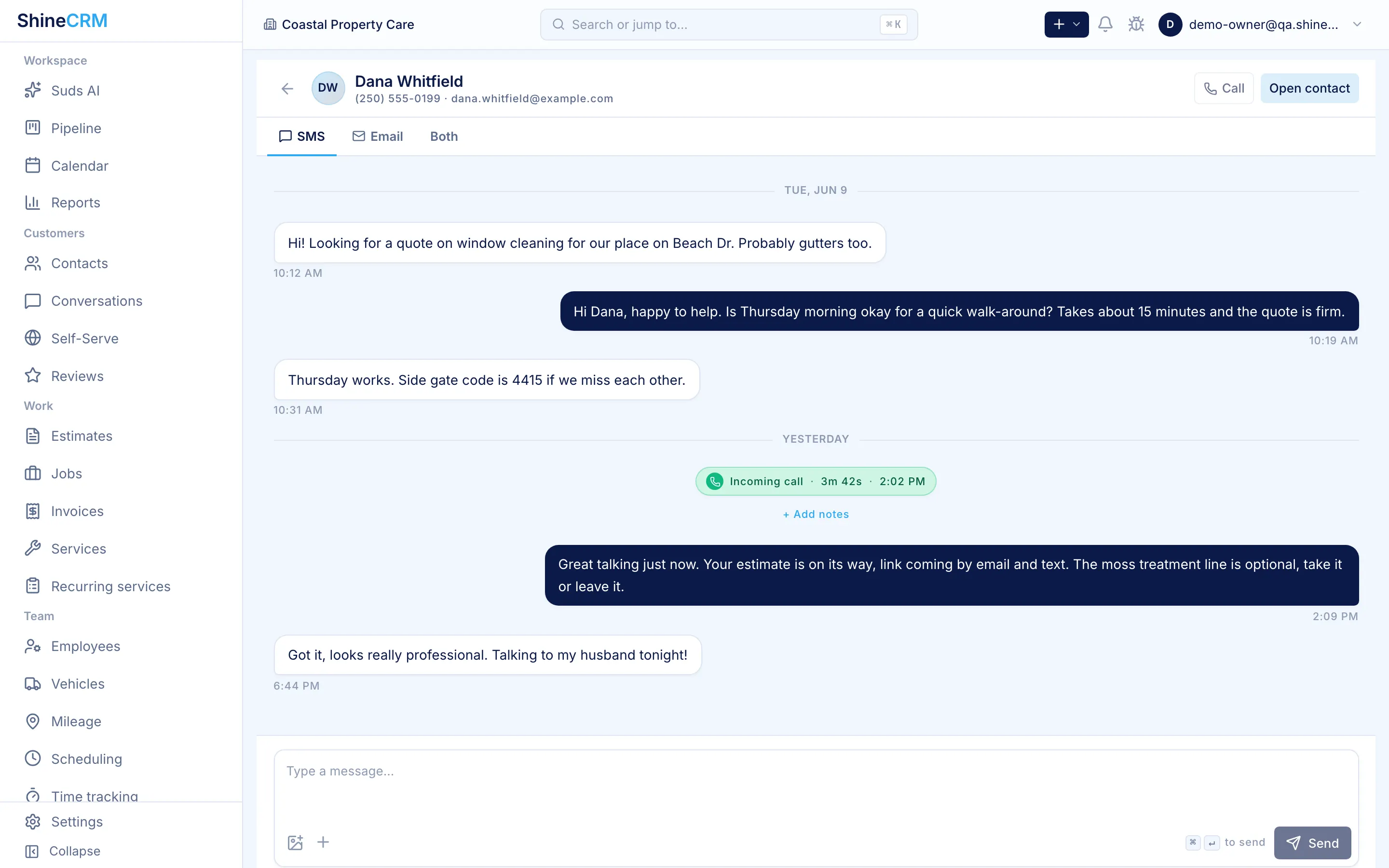
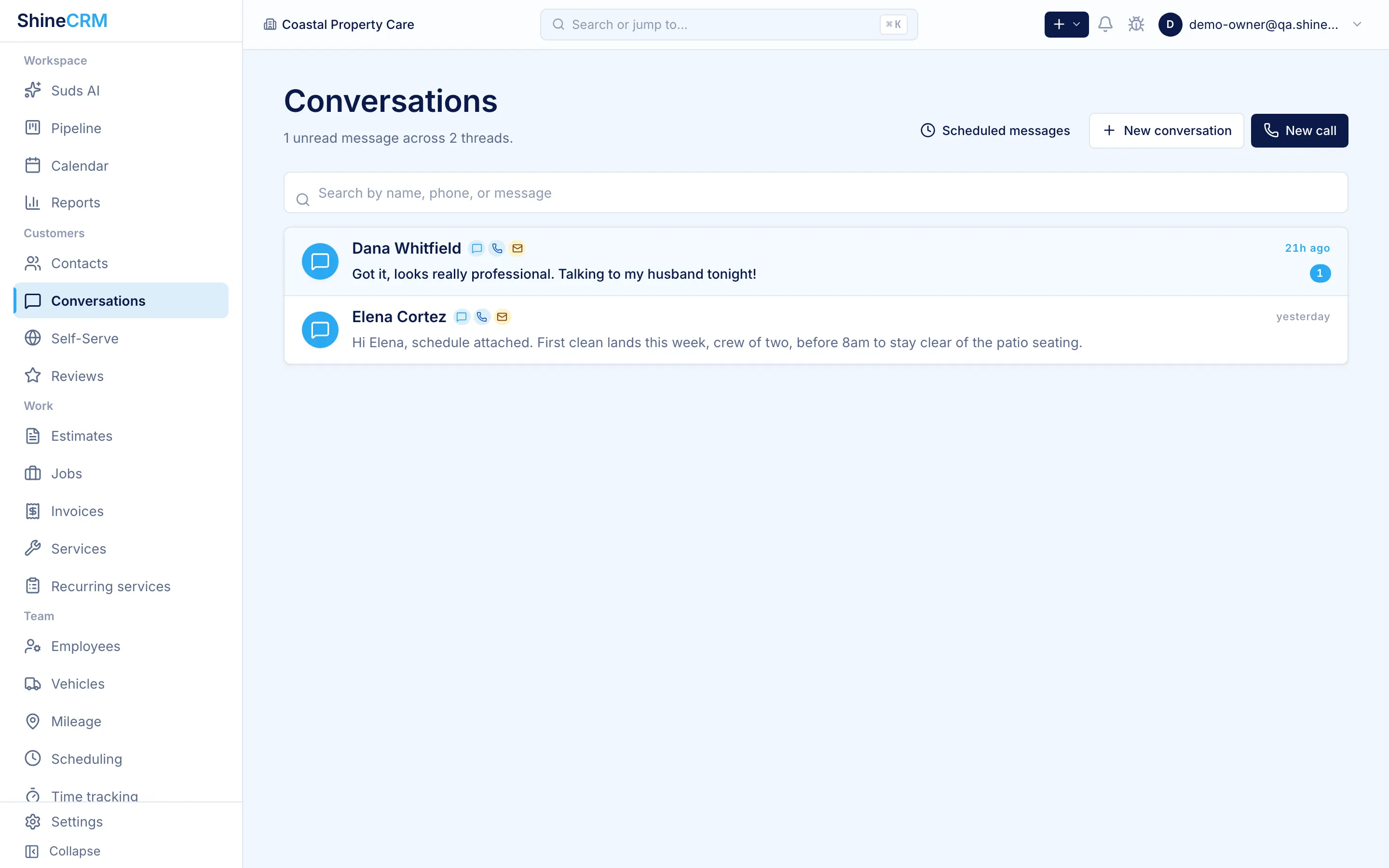
One conversation per customer

Calling, texting, and emailing on a single thread.

Every customer profile has one conversation view. Phone calls, SMS, and email all land in the same place, in order, so anyone on the team can pick up the thread without asking "what's the deal with this customer?"

Calls

Tap to call from the contact.

Outbound and inbound calls show up on the customer profile automatically. No copy and paste, no "did anyone follow up?"

Texts

Two-way SMS, fully logged.

Send a text from ShineCRM, get the reply back in the same thread. Works on web, on mobile, and across team members.

Email

Sent and received, in line.

Outbound emails and customer replies live on the same timeline as calls and texts, so there's never any digging through Gmail to find what was said.

Emails that look the part

Branded HTML emails for every estimate, invoice, and job.

Estimates, invoices, and job updates go out as polished, branded emails, not plaintext attachments. Customers see your logo, your colors, and a clean call to action. Replies come back as normal email, threaded on the customer profile.

Templated signatures

Fill out your signature once. Every operator on your team can send from a consistent, on-brand template instead of inventing one per email.

Branded transactional templates

Estimate sent, invoice issued, job confirmation, follow-up. Each template uses your org's logo and colors so customer-facing email looks professional out of the box.

Replies stay readable

We send styled HTML, but customer replies render as normal email. No design jank when the conversation gets going.

Attachments and PDFs included

Estimate and invoice PDFs are generated and attached automatically, so customers always have a copy they can save or forward.

Personal inbox sync

Reply from the email you actually use.

You shouldn't have to live inside a CRM to answer a customer. Connect your normal email address, and ShineCRM keeps the conversation in sync without you changing where you work.

Step 1

Send through ShineCRM.

Outbound emails go out branded, from your business address, attached to the right customer and job.

Step 2

Replies forward to you.

When the customer replies, ShineCRM forwards the message to your personal inbox so you can read and respond without logging in.

Step 3

Your reply gets logged.

Reply from your normal email client. ShineCRM relays the response back to the customer and keeps the full thread on their profile.

Everything stays attributed to the right user, the right customer, and the right job. The history is complete, even when nobody opened the app to send it.

Calls, recording, transcripts

Never re-listen to a long call to find one detail.

Calls through ShineCRM are recorded, transcribed, and summarized. Skim the summary, jump to the relevant moment in the transcript, and get on with your day.

Call recording

Every business call is recorded and saved to the customer's profile, with audio playback right inside the conversation thread.

Full transcripts

Every recording is transcribed and searchable. Scan instead of scrubbing, and quote customers back to themselves when you need to.

AI call summaries

A short summary at the top of each call captures what was discussed and what was committed to, so you don't have to re-listen to know.

AI contact summaries

A briefing on every customer, before you pick up the phone.

ShineCRM reads everything on a contact (calls, texts, emails, jobs, estimates, invoices) and gives you a short summary of where things stand, plus suggested next steps. You walk into the conversation already up to speed.

Status at a glance

One paragraph: who they are, what work you've done for them, what's pending, and what they last said.

Suggested next steps

Concrete recommendations, like "send the estimate you discussed on Tuesday" or "follow up on the unpaid invoice from last month."

Everything in one inbox

Eight capabilities. One conversation per customer.

Unified thread

Calls, texts, and email on the same timeline, per customer.

Two-way texting

Send and receive SMS from web and mobile, fully logged.

Branded HTML emails

Estimates, invoices, and job updates as polished templates.

Templated signatures

Consistent, on-brand signatures across every operator.

Personal email sync

Reply from your normal inbox, stay logged in the CRM.

Call recording

Every business call recorded and saved with the contact.

Call transcripts

Searchable text of every call, no scrubbing through audio.

AI summaries

Per-call summaries and per-contact briefings with next steps.

How it compares

Built for the way exterior cleaners actually communicate.

Most CRMs handle one or two channels well and ignore the rest. Owners end up bouncing between Gmail, a personal phone, a separate texting app, and a contact list scribbled on a clipboard. ShineCRM pulls all of it into one workflow.

Capability Typical setup ShineCRM Unified Inbox
Calls, texts, and email on one thread Three apps, three places One conversation per customer
Two-way SMS with team visibility Owner's personal phone Built in
Branded HTML email templates Plain Gmail or copy-paste Yes
Reply from your personal inbox Replies orphaned outside the CRM Forwarded both ways, logged
Call recording Often missing Built in
Call transcripts Often missing Built in
AI call summaries No Yes
AI contact briefings with next steps No Yes

Frequently asked

Questions, answered.

What is a unified inbox in a CRM?

A unified inbox combines every communication channel with a customer (phone calls, SMS, and email) on a single timeline tied to that customer's profile. In ShineCRM, calls placed through the app, two-way SMS, and email all show up in one thread, attributed to the team member who sent each message.

Does ShineCRM record phone calls?

Yes. Every business call placed or received through ShineCRM is automatically recorded, saved on the customer's conversation thread with audio playback, and tied to the right team member and timestamp.

Does ShineCRM transcribe and summarize calls?

Yes. Every recorded call is automatically transcribed and gets a short AI-generated summary at the top of the entry covering what was discussed, what was agreed, and what's outstanding. Transcripts are searchable across the whole org.

Can I reply from my personal email instead of inside ShineCRM?

Yes. ShineCRM can forward customer email replies to your personal inbox. You reply from your normal email client and ShineCRM relays your response back to the customer and logs the full thread on their profile. The customer only ever sees your business address.

Does ShineCRM support two-way texting?

Yes. ShineCRM provides two-way SMS on your business number. Send and receive texts from web and mobile, with every message logged on the customer's conversation thread and visible to your whole team.

What kind of emails does ShineCRM send?

ShineCRM sends estimates, invoices, job confirmations, and follow-ups as branded HTML emails using your organization's logo and colors. PDFs are generated and attached automatically. Customer replies render as normal email so the conversation stays readable.

The most convenient inbox for exterior cleaners

Every customer conversation, in one place.

Calls, texts, emails, transcripts, and AI summaries on one customer profile. Reply from wherever you actually work, and never lose context again.